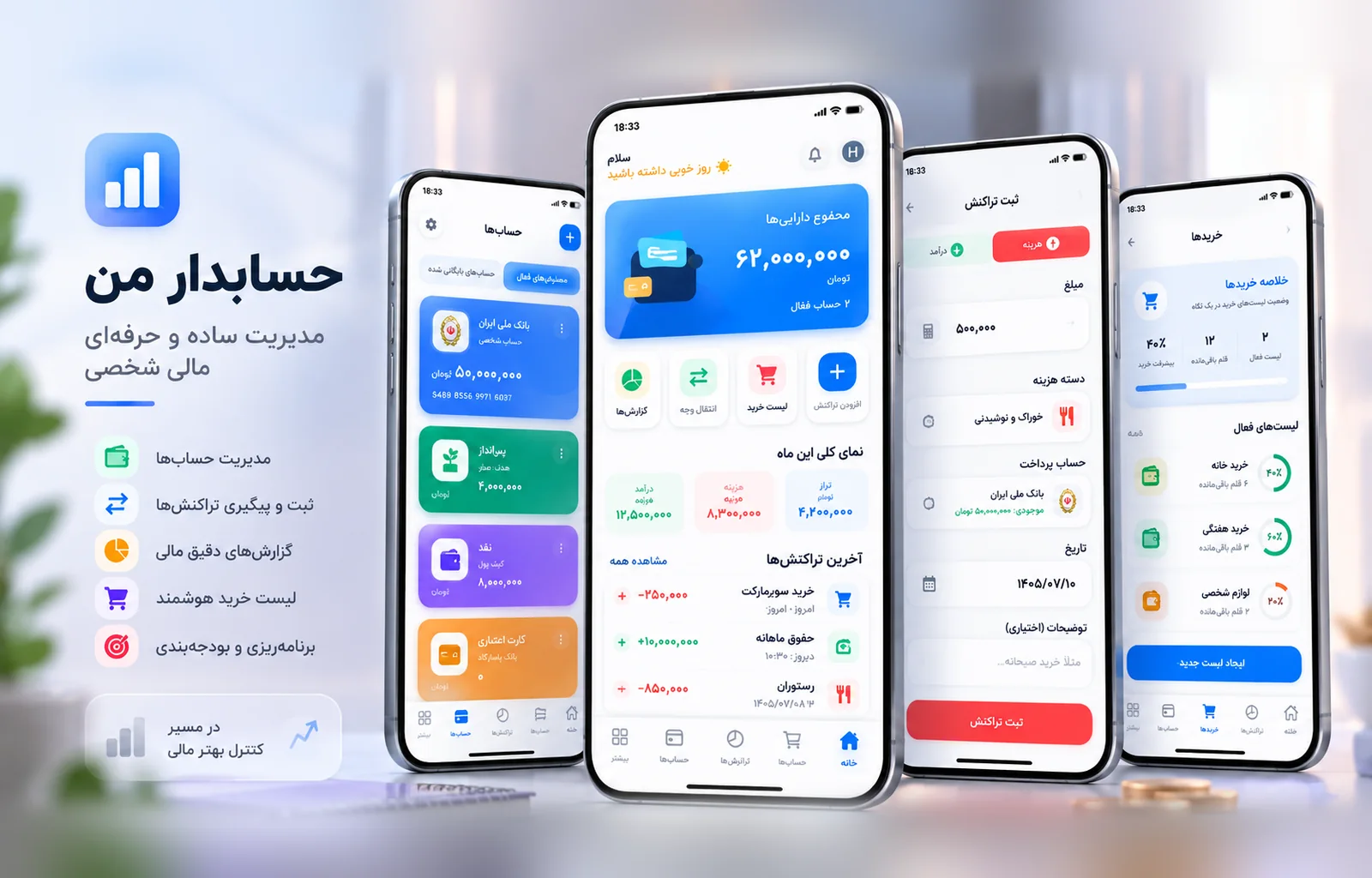

Designing and developing a personal finance application focused on account management, transactions, transfers, shopping lists, Persian user experience, and an architecture that can continue to grow
Starting the Project; Personal Finance Should Not Feel Complicated
Many personal finance tools are either too limited or overloaded with features and dashboards.
The idea behind Hesabdar Man started from a simpler question:
Can everyday money management feel fast, clear, and natural without turning into something that resembles enterprise accounting software?
The project was designed around that goal.
Users should be able to create accounts, record income and expenses, transfer money between accounts, and gradually use additional tools such as shopping lists, all inside a clear Persian interface.
The product is still under active development, and its capabilities are being expanded and refined step by step.
The Goal; Building an Everyday Tool, Not Just a Financial Dashboard
The goal of Hesabdar Man was never to become a collection of attractive charts.
It needed to be useful every day.
Recording an expense should not take too long.
Moving money between two accounts should not require creating two manual transactions.
A shopping list should not feel disconnected from financial planning.
From Data Entry to Managing Money Flow
Each major feature was designed around practical questions:
How much money is currently available across accounts?
How much has been spent this month?
How much income has been recorded?
How should transfers between accounts be represented?
How much is expected to be spent on an upcoming shopping list?
This approach kept the product focused on real workflows rather than a long list of disconnected features.
Accounts; The Foundation of the Financial Structure
Account management is one of the core layers of the application.
Users can create and manage different accounts and keep their financial activity connected to the correct source.
But account management goes beyond creating a name and balance.
During development, features such as editing, selecting a default account, archiving, and deletion were added to the model.
Deleting Accounts Without Breaking Financial History
One important design question was what should happen when an account has already been used in transactions.
Simply deleting it could damage financial history or create incomplete records.
That meant deletion rules had to respect related data.
Undo behavior was also introduced for certain actions so that an accidental operation would not immediately become irreversible.
Transactions; Recording Income and Expenses Quickly

Transactions form the core of any personal finance application.
In Hesabdar Man, users can record expenses and income and view a monthly financial summary.
Recent transactions are prioritized so users can quickly understand what has happened most recently.
Reducing Friction in Daily Entry
In a finance app, every unnecessary step increases the chance that users eventually stop recording their activity.
For that reason, the transaction flow is designed to remain direct.
A simple expense should not require navigating through several screens or menus.
The goal is to make financial entry fast enough to become a natural daily habit.
Transfers Between Accounts; One Financial Event, Not Two Independent Transactions

Moving money between accounts is neither income nor an expense.
If the data model does not understand that, transfers can easily distort reports and balances.
That is why transfers were designed as connected financial records rather than unrelated transactions.
Preserving Both Sides of a Transfer
Information such as transfer IDs and related account IDs is stored to maintain the relationship between the outgoing and incoming sides.
This allows the application to understand that money leaving one account and appearing in another belongs to the same operation.
That decision becomes increasingly important as reporting and financial analysis grow.
The transfer interface also went through several rounds of refinement, including bank logo display, date behavior, Toman labels, spacing, and header alignment.
Persian User Experience; RTL Is More Than Text Alignment
A major part of the project is designing specifically for Persian-language usage.
Real RTL design is not simply applying direction: rtl.
The placement of icons, titles, navigation arrows, spacing, and component behavior all need to match Persian reading patterns.
Creating a Consistent Component Standard
A consistent layout pattern was established across the interface.
Icons and titles sit on the right side, while navigation or action arrows move naturally to the left.
This helps different screens feel like parts of the same product.
The design also avoids relying unnecessarily on row-reverse, which can create confusing behavior in more complex component layouts.
Shopping Lists; Connecting Planning With Personal Finance

Shopping Lists became one of the larger feature areas added during development.
The goal was not to create another generic task list.
A shopping list can also become part of financial planning before a purchase actually happens.
Users can define a list name, date, estimated amount, notes, and reminder settings.
From a Simple List to a Shopping Flow
After creating the list structure, users can select categories and subcategories for the items they need.
The selection experience was designed to remain usable even when category structures grow.
Users can also add new categories when needed.
Only selected item names are shown in the final flow so the interface stays focused instead of becoming unnecessarily crowded.
Draft Behavior; Data Should Not Exist Before the User Confirms It
One important decision in the Shopping Lists flow involved when the list should actually be created.
An earlier approach could create a database record before the user had completed the selection process.
That could leave behind incomplete or abandoned records.
The flow was adjusted so the list is created only after the user confirms the final action.
Data Should Reflect Real User Decisions
This principle matters across the product.
If a user has not completed an operation, the system should not assume that they have.
Keeping data aligned with actual user intent makes the database cleaner and the product behavior more predictable.
Interface Components; Building a Shared Visual Language
As the application grew, more reusable components were created for different parts of the experience.
For example, ShoppingHeroCard presents high-level shopping information and progress, while ShoppingQuickActions provides faster access to common actions.
A Feature Must Appear in the Right Place
Having a feature is not enough.
Users need to discover it and understand when it is useful.
That means information architecture and action placement are as important as the feature itself.
Even labels evolved during development.
For example, the section initially called “Templates” was renamed to “Ready Lists” to make its purpose clearer.
Mobile Experience; Small Details Can Create Large Problems
On mobile, details such as keyboard behavior, safe areas, screen height, and scrolling can easily break an otherwise simple form.
Several issues of this kind were identified and corrected during development.
The Keyboard Is Part of the Interface
When users enter an amount or title, the keyboard should not hide the main action button or make part of the form unreachable.
Problems like these usually do not appear in static mockups.
They only become obvious in executable screens.
That is why a significant part of the development process has involved testing real screens and correcting their behavior rather than relying only on visual design.
Technical Architecture; A Product That Needs Room to Grow
Hesabdar Man is being developed with React Native and Expo.
Zustand is used for state management, while SQLite handles local data storage.
This combination works well for a mobile product that needs to remain responsive and manage important data locally without requiring a constant server connection for every operation.
Evolving the Schema Without Losing Existing Data
As features have been added, the database structure has also evolved.
New fields have been introduced for transfers, related accounts, and other financial information.
These changes need to happen through controlled migrations so existing installations can move to the newer schema without losing user data.
Schema evolution and migration safety are therefore part of the product development process, not an afterthought.
A Product That Is Still Being Completed
Hesabdar Man is not a finished or closed product yet.
Several areas are still being refined, and additional capabilities remain on the roadmap.
These include continued development of Shopping Lists, improvements to financial workflows, transaction attachments, and broader UX refinement.
Dark Mode is also planned for a later stage.
Building the Product in Stages
The staged approach is intentional.
Instead of adding a large number of features at once, each area is first brought to an executable state, tested, and then improved.
This makes it easier to identify real product problems before the architecture becomes more complex.
The Result; Building a Financial Tool That Should Be Usable Every Day
The main challenge of Hesabdar Man is not creating a visually attractive balance screen.
The challenge is making sure the product does not become tiring in everyday use.
Recording an expense, moving money, managing accounts, and planning purchases should remain fast and understandable.
At the same time, the data architecture needs to be structured enough to support future reporting and new financial capabilities without requiring the application to be rebuilt from scratch.
Hesabdar Man is still in development, but the process already shows how much a personal finance product depends on small interaction decisions.
What We Learned From This Project
A personal finance product becomes useful only when using it is easier than avoiding it.
Simplicity Is the Result of Many Decisions
A simple interface usually does not come from a simple system behind it.
For a user to press one button, decisions need to be made about data structure, validation, error states, keyboard behavior, deletion rules, account relationships, transfers, and many other details.
In Hesabdar Man, the goal is to keep that complexity behind the product.
Users should only see what matters to them at that moment.
As development continues, this principle remains one of the main foundations for future product decisions.
Project Snapshot
Project Hesabdar Man / Personal Finance
Type NaarCode Lab / Internal Product
Status In Development / Work in Progress
Scope Product Design · Mobile UX · Financial Workflows · Account Management · Transactions · Transfers · Shopping Lists · Local Data Architecture
Platform Mobile Application
Technology React Native · Expo · SQLite · Zustand
Current Direction Continued development, workflow refinement, new financial features, and UX improvements.