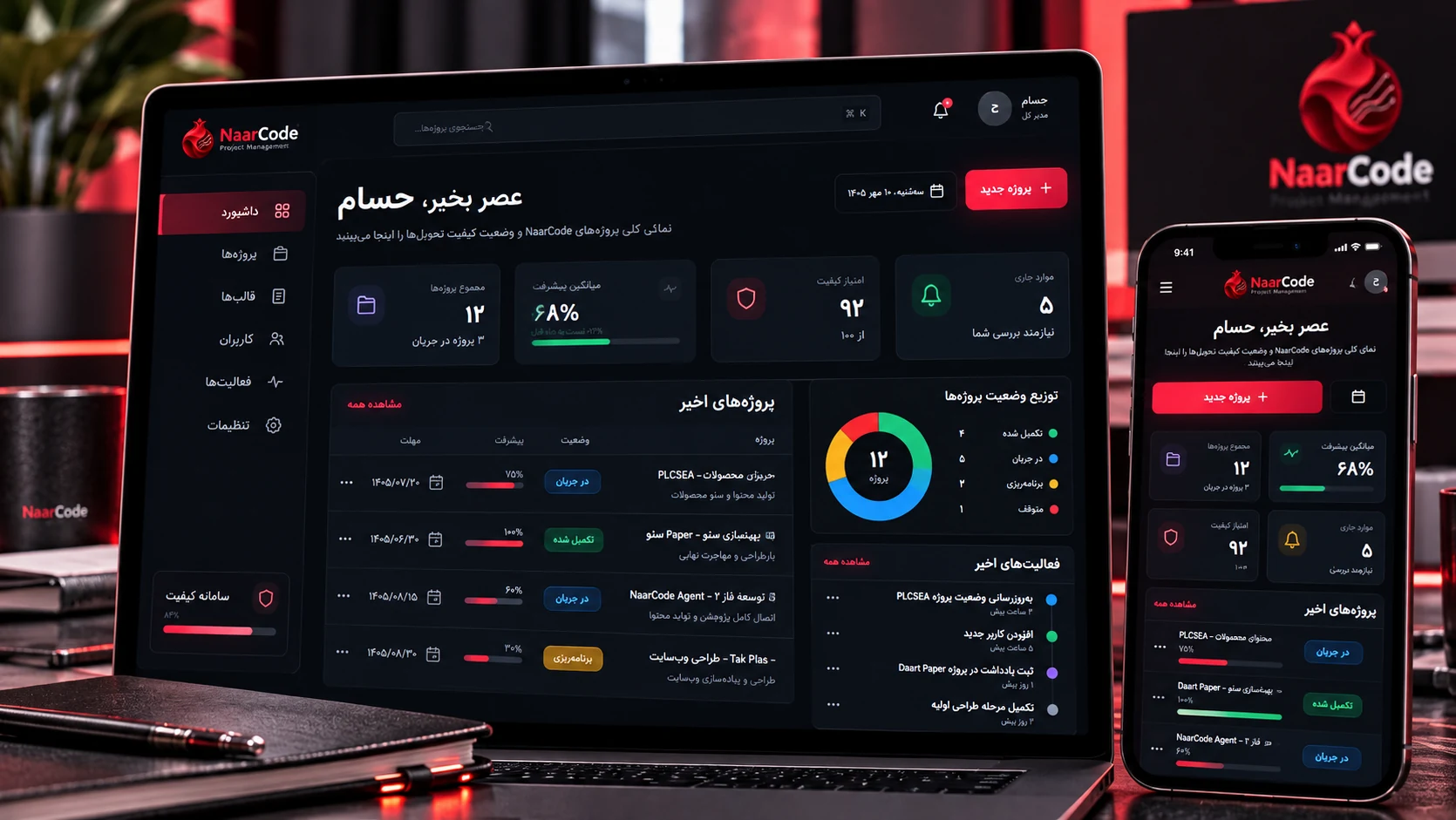

Designing and developing a custom internal project management system for NaarCode, focused on project structure, dynamic checklists, quality control, progress tracking, activity history, and delivery standards
Starting the Project; When Project Management Is More Than Task Management
As the number of projects, files, decisions, and delivery stages grows, managing work can no longer rely on a simple task list.
Every project has a different structure.
A WordPress website does not follow the same path as a mobile application or a custom business system.
The requirements around design, development, security, SEO, testing, deployment, and final delivery can vary significantly.
If those differences only live in the team’s memory, part of the quality process becomes dependent on people remembering what to check.
NaarCode Project Manager was created to solve that problem.
The goal was to build an internal system that could keep a project structured from the moment it is created through quality control and final delivery.
The product is still under active development, and its capabilities continue to evolve based on real NaarCode project needs.
The Goal; Turning Internal Standards Into an Executable System
Keeping a checklist in a document can be useful.
But when the same standards need to be applied across different projects, updated over time, tracked item by item, and eventually reflected in measurable project quality, a static document is no longer enough.
The goal of Project Manager was to make NaarCode’s internal standards part of the project workflow itself.
From Documentation to Workflow
Instead of checking a separate document at the end of a project, the checklist should exist alongside the project from the beginning.
The project type is defined.
The relevant structure is created.
The correct checks and tasks become available.
And their status can directly affect project progress and quality.
Projects; Giving Every Project Its Own Workspace
The core of the system is the Project.
Each project has its own information, status, phases, and activity.
The goal was not to place every project inside one giant task list.
Each project should function as its own workspace.
Structure Instead of Fragmentation
Inside a project workspace, key information, checklists, progress, activity, notes, and files should remain connected.
This makes it easier to return to a project after several days or weeks without searching through multiple tools just to understand its current state.
The project itself becomes the central source of operational context.
Project Wizard; Starting With the Right Structure
One of the important parts of the system is the project creation wizard.
Not every project should start from the same template.
The wizard helps identify what kind of project is being created and which areas matter from the beginning.
Asking the Right Questions at the Start
Instead of creating an empty project, the system can prepare a more relevant structure based on the initial setup.
A project might involve:
Frontend
Backend
Database
Authentication
SEO
Deployment
Mobile
or Integrations.
Another project may only require a subset of those areas.
The idea is to let the system understand the context early and activate only the controls that actually matter.
Dynamic Checklist; A Checklist That Adapts to the Project
One of the most important parts of Project Manager is the Dynamic Checklist.
A checklist should not be a fixed list of hundreds of items.
If a project has no mobile application, checks around Safe Area or keyboard behavior are irrelevant.
If the project has no authentication layer, session and login checks should not appear unnecessarily.

Only What Actually Matters
The checklist structure adapts to the project type and its selected characteristics.
This has two advantages.
First, users are not overwhelmed by irrelevant checks.
Second, quality control becomes more meaningful because the checklist reflects the actual project.
Instead of being a generic document, the checklist becomes part of the project logic.
Quality Control; Done Is Not the Same as Ready
One of the key ideas behind the system is that finished development does not automatically mean a project is ready for delivery.

A feature may be implemented, while:
Responsive behavior has not been tested.
Error states are incomplete.
SEO has not been reviewed.
Backups have not been validated.
Or user permissions are still incorrect.
Quality Score
To create a clearer view of actual readiness, the concept of a Quality Score became part of the system.
Progress can answer:
How much of the work has been completed?
Quality Score is intended to answer a different question:
How well does the project currently meet the expected quality standards?
That distinction between Completion and Quality is one of the central principles of the product.
Progress; A Percentage That Should Mean Something
A progress bar is only useful when the number behind it can be trusted.
If progress is entered manually based on a rough estimate, it quickly loses value.
In Project Manager, progress is designed to reflect the actual state of project stages and checklist items as much as possible.
Understanding the Project at a Glance
The goal is to make it possible to open a project and quickly understand:
How much of the work has been completed?
Which areas are still open?
Where are the biggest risks?
And how close is the project to a deliverable state?
This becomes increasingly important in longer and more complex projects.
Templates; Standardization Without Making Every Project the Same
When similar projects are delivered repeatedly, knowledge from previous work should not disappear.
Templates were introduced to preserve useful structure.
A template can provide the initial project setup and related checklist groups.
Reusing Experience From Previous Projects
The purpose of templates is not to force every project through the exact same process.
The purpose is to reuse what has already been learned.
For example, a WordPress project might begin with controls related to:
Performance
SEO
Security
Forms
Responsive Design
Deployment
and Backup.
A mobile application would begin with a different set of controls.
Templates allow the system to preserve useful standards while still adapting to different project types.
Activity; Projects Need History
In a real project, the current state is not the only thing that matters.
Sometimes it is important to know what changed, when it changed, and what decisions were made earlier.
That is why Activity is part of the system architecture.

Preserving Project Context
The Activity Log helps important project changes remain traceable.
Notes and Files are also part of the project workspace so supporting context can remain in the same place.
This becomes especially useful when a project is reopened after a period of time or when another person needs to understand what has already happened.
Users and Access; Not Everyone Should Control Everything
The system was not designed as a static dashboard.
Login and Users are part of the V1 direction so the product can support different roles over time.
Access Based on Responsibility
In an internal project management system, not every user needs access to Settings or user management.
Role and permission structures are intended to reflect that difference.
Some users may focus on project execution, while others may have broader administrative access.
Like the rest of the product, this area is being developed progressively.
Persian and RTL Experience; Internal Tools Still Need Good UX
Project Manager is intended for real daily use.
When a tool is opened repeatedly throughout the week, interface quality matters.
Persian and RTL behavior were considered from the beginning rather than being added as an afterthought.
Showing More Information Without Creating More Noise
One of the challenges in this kind of system is displaying a large amount of project information without turning the interface into an overloaded dashboard.
Progress, checklists, status, activity, and controls all need clear hierarchy.
The goal is to make the most important information easy to find without putting every detail on the screen at once.
Technical Architecture; A Foundation for an Internal Product That Can Grow
NaarCode Project Manager is being developed as a modern web application.
The frontend is built with Next.js and React.
TypeScript is used to keep the codebase more predictable and easier to maintain.
PostgreSQL is used for the data layer.
The System Needs to Grow With New Requirements
This project is naturally expected to evolve as new projects create new needs.
A real project may expose a missing checklist item.
A template may need to become more specialized.
A workflow may need an additional stage.
The architecture therefore needs to support change without turning into a collection of one-off exceptions.
The goal is to build an extensible system, not a fixed dashboard.
A Product That Learns From Real Projects
Project Manager is still under active development.
That does not only mean that more features remain to be built.
Part of the product design is intentionally being shaped through real use inside NaarCode projects.
Internal Systems Should Be Shaped by Real Work
Some requirements only become clear when real projects enter the system.
A checklist may prove too long.
A certain stage may become more important than expected.
A project type may require a completely different template.
For that reason, Project Manager is not being treated as a finished product designed once and left unchanged.
It is being developed through a continuous cycle of use, refinement, and expansion.
The Result; Building a System for Delivering Better Projects
The goal of NaarCode Project Manager is not to replace every project management tool on the market.
It is being built for a more specific purpose:
Managing NaarCode projects according to NaarCode’s own workflows and quality standards.
Projects, the Wizard, Dynamic Checklists, Progress, Quality Score, Templates, and Activity all support that goal.
The system should not only show what remains to be done.
It should help answer:
Where does this project currently stand?
What has not been reviewed yet?
And is the project actually ready to be delivered?
What We Learned From This Project
A project management tool becomes more valuable when it does more than record work.
It should also improve how the work is performed.
The System Should Preserve Team Knowledge
Every project generates decisions, patterns, and lessons.
If that knowledge remains only in people’s heads, part of it has to be rediscovered on the next project.
One of the long-term goals of Project Manager is to turn those lessons into templates, checklists, and workflows.
At that point, the system does more than manage projects.
It gradually becomes part of NaarCode’s operational knowledge base.
Project Snapshot
Project NaarCode Project Manager
Type NaarCode Lab / Internal Product
Status In Development / Work in Progress
Scope Project Management · Dynamic Checklists · Quality Control · Progress Tracking · Templates · Activity · Notes · Files · User & Access Management
Platform Web Application
Technology Next.js · React · TypeScript · PostgreSQL
Current Direction Completing the V1 project workflow, refining dynamic quality checklists, improving progress and quality scoring, and expanding reusable project templates.