
Designing and developing an operational system for managing requests, user interactions, and the day-to-day workflows of an insurance agency
Starting the Project: When the Problem Is More Than Answering Users

In many service businesses, daily operations depend on messages, phone calls, manual follow-ups, and information stored across different places.
For an insurance agency, this can quickly turn into a complex workflow.
A customer asks a question, submits a request, provides information, and expects a clear response. On the other side, the agency team needs to review that request, categorize it, follow up, and move it to the next stage when necessary.
The goal of this project was to bring part of those interactions and operational processes into a more structured and controllable system.
The Goal: Build a Real Tool for Day-to-Day Operations
From the beginning, it was clear that the project should not become just another chatbot with predefined answers.
The system needed to manage part of the real operational workflow.
From Message to Process
The core user journey was designed to go beyond a simple conversation:
Start interaction → Select service → Submit information → Receive response → Admin follow-up
This turned the bot from an isolated communication interface into part of the agency's operational process.
The Challenge: Simplicity for Users, Control for Administrators
One of the main challenges was balancing the two sides of the system.
For customers, the experience needed to remain simple and fast.
Administrators, on the other hand, needed enough control to manage requests, user information, and workflow status.
A Simple Interface in Front, More Logic Behind It
Users should never have to understand the internal complexity of the system.
From their perspective, the interaction should feel like a straightforward conversation.
Behind the scenes, however, the system needs to know each user's current state, the stage of the workflow, the information already collected, and what should happen next.
This difference between a simple interface and a more complex internal workflow became one of the core design principles of the project.
The Bot: The User's Entry Point Into the System
The main user-facing interface was built as a bot on the Bale messaging platform.
The bot needed to guide users through each stage, display the right options, and collect required information step by step.
Instead of presenting every available option at once, each next step was determined by the user's previous choices.

Managing User State
To preserve the flow of each conversation, the system required session management.
This allowed the bot to understand where each user was in the process and determine how the next message should be handled.
This became particularly important for multi-step forms and date-selection flows.
User Experience: Reducing Friction in Multi-Step Processes
One of the main UX goals was to prevent users from facing long forms or complicated interfaces when submitting a request.
Information was collected gradually, and each step only presented what was necessary for the next action.
Persian Date Selection
One area that required additional attention was the Persian date picker.
Users needed to select dates in a familiar format without converting dates to Gregorian format or typing them manually.
This part of the flow was refined during development so that selected dates were stored correctly while the interaction remained straightforward.
Response Time: Part of the User Experience
In early versions, the start command had a noticeable response delay.
Even if the underlying logic works correctly, several seconds of inactivity can make users assume that the bot is not responding.
For that reason, response time and request execution became part of the optimization process.
Performance Is Not Only a Technical Concern
In this type of system, performance directly affects user trust.
The goal was to make the main interaction paths respond without unnecessary delays and provide immediate feedback whenever possible.
Admin Panel: Where the Operational Work Happens
The bot represented only one side of the system.
For the solution to work in a real operational environment, administrators also needed a clear interface.
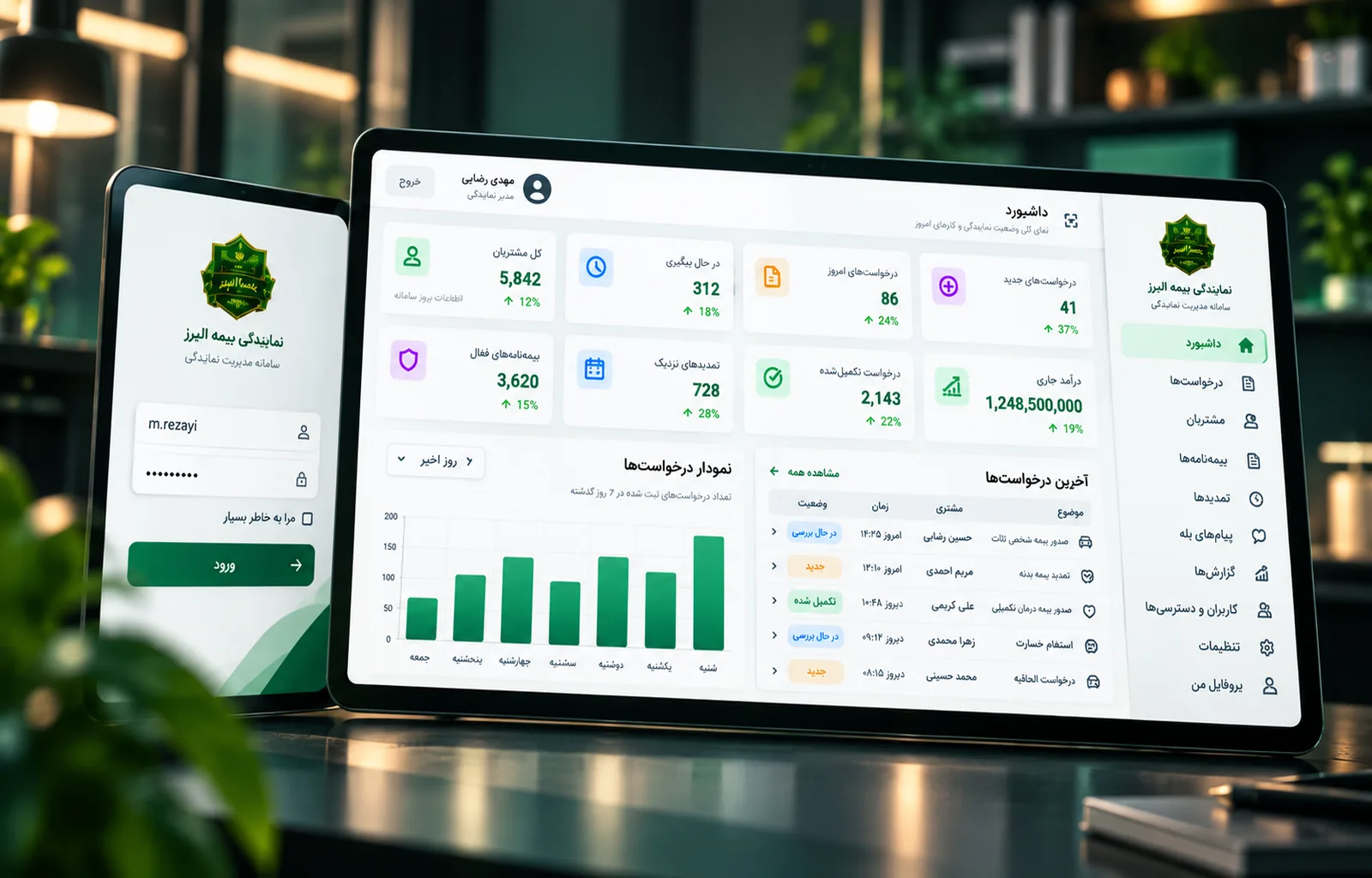
The admin panel was designed to provide visibility and control over requests, user information, and related operational tasks.

Designed for Everyday Use
The focus of the administration interface was not limited to visual design.
Important information needed to be accessible quickly, and non-technical staff had to be able to perform routine tasks without unnecessary complexity.
Cards, statuses, user information, and management flows were structured around this requirement.
Visual Identity: Moving Beyond a Generic Admin Interface
One of the important refinement phases of the project focused on the visual language of the admin panel.
Earlier versions felt too close to generic management dashboards.
The goal was to make the system feel like a purpose-built product for the insurance agency.
A Persian Interface Aligned With the Brand
Typography, sizing, cards, spacing, and the agency's actual logo were incorporated into the design.
Unnecessary elements were removed, and the card structure was refined to make the final interface cleaner, more consistent, and more professional.
Technical Architecture: A Modular Structure for Future Development
The system was developed with Node.js, with the Bale API used for bot communication.
Instead of placing the entire application logic inside one large file, the project was divided into clearly defined modules.
Separation of Responsibilities
API communication, bot logic, handlers, keyboards, sessions, and environment configuration were separated from one another.
This modular structure made it easier to change or extend individual parts of the system without affecting the entire application.
It also made bugs easier to isolate and resolve.
Security and Access: Keeping the System Under Control
Any operational system that handles real user information and service requests needs appropriate access control.
The administration environment therefore needed to remain separate from the public user experience and accessible only to authorized users.
Roles and Permissions
As the system evolved, the architecture was designed to support login, user roles, and access control.
This makes it possible to define which administrative users can access specific areas or actions.
The broader goal was to move the project from a simple operational tool toward a more structured system suitable for real-world use.
The Result: A Bot as Part of Operations, Not Just a Demonstration
The outcome was not simply a conversational bot.
The system was designed to connect part of the customer interaction process with the internal workflow of the insurance agency.
Customers received a simple path for submitting requests, while administrators gained a clearer structure for managing information and operational tasks.
The most important result was straightforward:
Automation creates real value when it connects directly to the actual workflow of the business.
What We Learned From the Project
In operational products, the interface is only one part of the problem.
The deeper challenge is translating a real-world workflow into a digital system without making it more difficult for the people using it.
The bot, admin interface, session management, performance, and technical architecture only become valuable when they work together as one reliable operational flow.
A Good System Should Simplify Work, Not Just Digitize It
Throughout the project, the key decisions revolved around one question:
How can we digitize a real operational process in a way that makes it simpler for customers and more controllable for the team running it?
Project Snapshot
Client: Alborz Insurance Agency Industry: Insurance Services Scope: Workflow Design, Bot Development, Admin Interface, User Experience, Session Management, Role & Access Structure Platform: Bale Bot / Web Admin Technology: Node.js, JavaScript, Bale Bot API, Axios